

e-Invoice
- Outgoing and incoming e-invoices
- Send purchase returns as e-invoices
- Export invoices
- Unit and product mapping
e-Invoicinge-Invoice · e-Archive · e-Waybill
Issue the invoice from the software in the office or from a phone in the field. Whether it becomes an e-Invoice (e-Fatura) or an e-Archive invoice (e-Arşiv) is decided by the recipient, the document is delivered to the Turkish Revenue Administration (GİB), and its status shows up in your software. No separate portal, login or data entry.
An e-Invoice (e-Fatura) is an electronic invoice issued between two taxpayers registered in the system of the Turkish Revenue Administration (GİB). An e-Archive invoice (e-Arşiv) is an electronic invoice issued to recipients not registered in the e-Invoice system, including end consumers. An e-Waybill (e-İrsaliye) is the electronic version of the waybill that documents the shipment of goods. Sahatek selects the correct document type based on the recipient’s registration status and lets you manage all three from the same screen.
You issue the invoice in your software and then re-enter it on a portal.
The invoice is issued once in the software and sent directly as an e-document.
Sales reps can’t issue e-Archive invoices in the field, so documents wait at the office.
e-Invoices and e-Archive invoices are sent from the mobile app at the point of sale with one tap.
You don’t know which invoices were delivered and which were rejected.
Delivery status, rejections and returns are shown in the list, and response logs are reported.
At month-end you have to send hundreds of invoices one by one.
Batch conversion to e-documents and batch sending do it in one go.
Outgoing e-documents
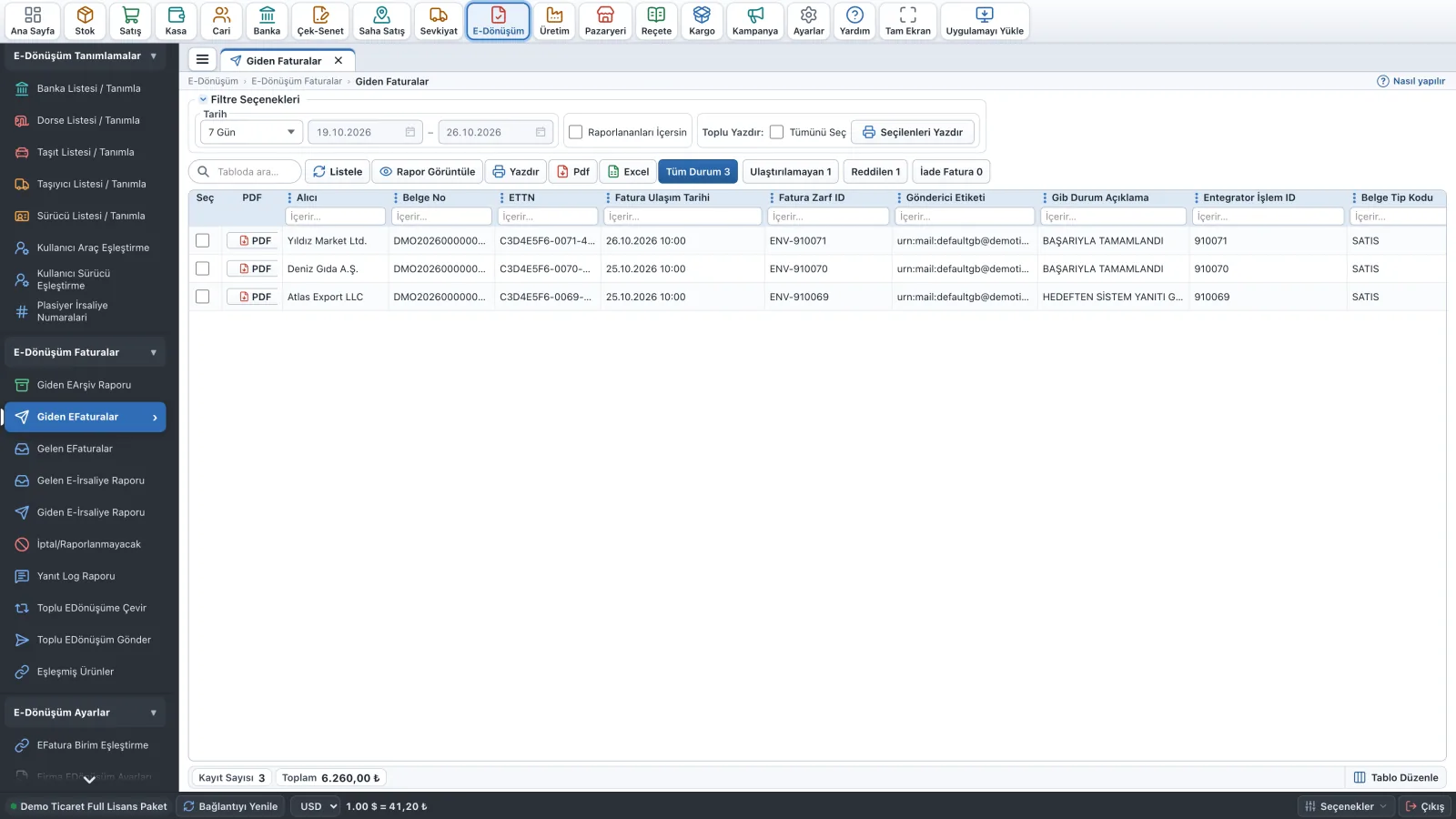
See the document number, ETTN (unique invoice ID), delivery date and GİB status description in your outgoing e-Invoice and e-Archive lists. Open the PDF, print it, export to Excel; filter out undelivered and rejected documents.
Mobile e-documents
The rep saves the sale as “E-Dönüşüm”; Sahatek determines the document type (e-Invoice or e-Archive) from the customer’s GİB registration. The document is sent to GİB with one tap, and the PDF is shared or handed over from a Bluetooth printer. Documents issued out of coverage wait on the device and are sent once a connection is back. Rep-specific number series are defined for e-Waybills.

You can also view your e-documents through the portal.
Fully integrated with Sahatek Ticari and Sahatek Mobile Sales.
What our users say
yaklaşık 1 yıla yakındır kullanıyorum bu programı. fatura ve saha kullanimi açısından gerçekten çok başarılı. desdek ekibine çok teşekkür ederim hiçbir zaman sorunlara kayıtsız kalmadılar. başta Tülay hanım ve tüm ekibe teşekkür.
6 Senedir kullanıyoruz çok memnunuz sahada kolaylıkla efatura kesip müşterilerimize efaturalarımızı teslim ediyoruz. Teknik destek çok iyi, program oldukça anlaşılır ve hızlı. Kesinlikle tavsiye ediyoruz.
1 yıla yakındır programı kullanıyorum. E faturaya geçildiğinde programı satın aldım. ÇOK Başarılı bir yazılım. Programı deneyimlerken ihtiyaç duyulan yazılım eklentileri dahil her konuda yardımcı olan Tamer bey ve Meltem hanıma çok teşekkürler.
You can issue e-Invoices (e-Fatura), e-Archive invoices (e-Arşiv) and e-Waybills (e-İrsaliye), and view your incoming e-invoices and e-waybills in the same software.
No. e-Invoicing works together with the Sahatek Ticari pre-accounting software and the Sahatek Mobile Sales app. You send the e-document from the same screen where you issue the invoice.
e-Documents are sent using credit packages. Call us for current credit prices and we’ll choose the right package for your volume together.
Yes. The document can be printed on a Bluetooth receipt printer and also shared as a PDF.
Field sales app for Android and iOS. Works offline and prints receipts on the spot.
ExploreDesktop & WebInventory, customer accounts, invoicing, cash and bank — on desktop and in the browser.
ExploreB2B & E-CommerceYour dealers order 24/7 from the Sahatek B2B app or b2b.sahatek.com.
ExploreRetail POSBarcode-based, scale-connected, touchscreen quick sale and checkout.
ExploreTailored to youModules, reports, integrations and apps built for your needs.
ExploreFrom the application to your first invoice, we’re with you every step of the way.